
The Bridge: JSON Over Patch Cables
Running Inside Ableton Live covers why Producer Pal fuses a Node.js server and Live's full API into one Max for Live device. This is how they actually talk to each other: two separate JavaScript runtimes sending JSON over Max patch cables.
Two runtimes in one device
Inside the Producer Pal device there are two JavaScript objects wired together in the Max patch:
node.scriptrunsmcp-server.mjs, the full Node.js MCP server. This is where the AI connects, where npm packages and the network live, but it has no access to the Live API.v8runslive-api-adapter.js, a JavaScript engine with direct access to the Live API, but no Node.js, no npm, and no network.
Neither one can call the other directly. The only thing connecting them is the Max patch itself: patch cables carrying Max messages back and forth. So every request and response is a Max message sent down a cable from one runtime to the other.
A Max message is a list of "atoms" (symbols and numbers). To move a tool call across that wire, Producer Pal serializes everything to JSON strings and ships them as atoms.
Here's the actual top-level patch:
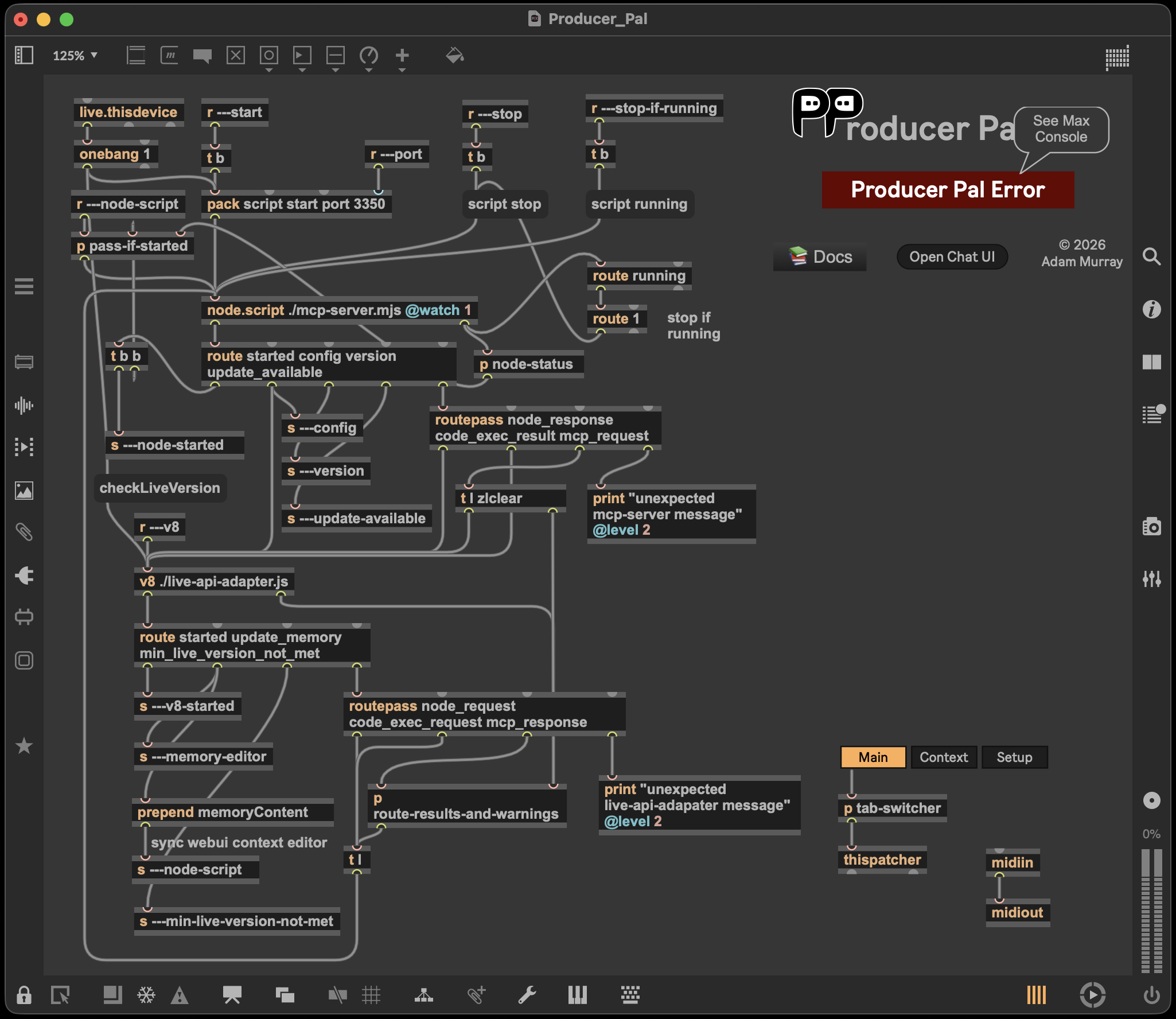
node.script ./mcp-server.mjs and v8 ./live-api-adapter.js are near the center, with patch cables running between them. The rest is plumbing for the device itself: the s ---… (send) and r ---… (receive) objects are wireless connections to the device's other tabs (Context and Setup) and to the server status display (the p node-status subpatcher shown as a bpatcher). The bridge proper is just the node.script ↔ v8 pair.
A round trip
When the AI calls a tool, here's the path the data takes:
Node → V8 (request). The MCP server emits a Max message:
mcp_request <requestId> <toolName> <argsJSON> <contextJSON>The
requestIdis a UUID used to match the eventual response back to the waiting promise. The patch routes this message to thev8object'smcp_request()handler.V8 does the work. It parses the JSON, runs the tool against the Live API (launching clips, writing notes, reading tracks, whatever was asked), and builds a result object.
V8 → Node (response). It serializes the result back to JSON and sends it home as an
mcp_responsemessage, which the server matches to the originalrequestIdand hands back to the AI.
Conceptually simple. Two things make it harder than it looks.
Problem 1: messages have a maximum length
A single Max message atom can't be arbitrarily long. There's a hard ceiling around 32,767 characters. Most responses stay well under it: the default compact format is token-optimized, and the read tools only return the include list they were asked for. But a big enough read still gets there, like a clip holding thousands of notes. Send that as one atom and Max silently truncates it, corrupting the message.
So the V8 side chunks the JSON string before sending, into pieces small enough to survive the wire:
MAX_CHUNK_SIZE = 30000   // ~30 KB per chunk, comfortably under the 32,767 limit
MAX_CHUNKS     = 100     // up to ~3 MB per response
planChunks() slices the JSON left-to-right into 30 KB chunks and sends them as multiple atoms in one message. The receiver glues them back together with a plain join(""). This relies on one guarantee Max gives us: the atoms of a single message arrive in the order they were sent, so no per-chunk sequence numbers are needed.
If a response somehow needs more than 100 chunks (~3 MB), Producer Pal refuses to send a corrupt blob. It replaces the payload with a clear "response too large" error instead. (You can find the chunking logic in mcp-response-utils.ts.)
Problem 2: getting warnings onto the right response
The second problem is subtler. While a tool runs, the V8 code may want to warn the AI about something, like "quantize parameter ignored for audio clip," for example. Producer Pal uses warn-and-skip rather than hard failures, so these warnings need to reach the AI as part of the response.
But there's a catch: a runtime's log and error output doesn't travel down patch cables. When the v8 object prints to the Max console, that text goes to the Max window. It's not part of any message coming out of the object, so warnings have to be deliberately collected and stitched into the response message before it crosses back to Node.
The tricky part is which response. A tool call is not the only thing running: parallel tool calls are routine, and some of Producer Pal's own bookkeeping runs after a response has already gone out. A warning that gets appended to whatever response happens to leave next is worse than no warning at all: it tells one request about a mistake another one made.
So console.warn() hands each warning to the request in flight, which buffers it and appends it to its own response (see v8-warning-capture.ts). V8 is single-threaded, so keeping that pointed at the right request comes down to two rules: a request re-asserts itself after every await it performs, and the two places V8 can suspend on a round trip to Node clear the buffer for the wait and restore it on resume. When nothing is in flight there is no response to append to, so the warning goes to the Max console instead: a real audience, and nobody else's tool result gets polluted.
The key to keeping the warnings apart from the result is a demarking symbol, which V8 appends to outlet 0 right after the JSON chunks:
$$___MAX_ERRORS___$$So the full response message that arrives back at the Node server looks like this:
mcp_response  <requestId>  <chunk1> <chunk2> … <chunkN>  $$___MAX_ERRORS___$$  <warning1> <warning2> …
└─ message ─┘ └─ id ─────┘ └──── JSON, split at 30 KB ───┘ └─── delimiter ───┘ └──── captured warnings ────┘
The Node side splits on that delimiter:
- Everything before it is JSON chunks → reassemble and
JSON.parse(). - Everything after it is captured warnings → each one is appended to the response as a
WARNING:text block, with repeats collapsed to a(xN)count.
So warnings emitted while talking to the Live API end up as text the AI reads, not messages lost in the Max console. The delimiter doubles as an integrity check: if it's missing, the receiver throws loudly instead of parsing a malformed message.
It's more machinery than a single process would need, and it's what lets one device offer a Node.js server and real-time Live control at the same time.