# Max for Live Device
The Producer Pal device is a Max for Live MIDI effect that connects Ableton Live
to AI by giving it an interface to the Live API.
## Main Tab
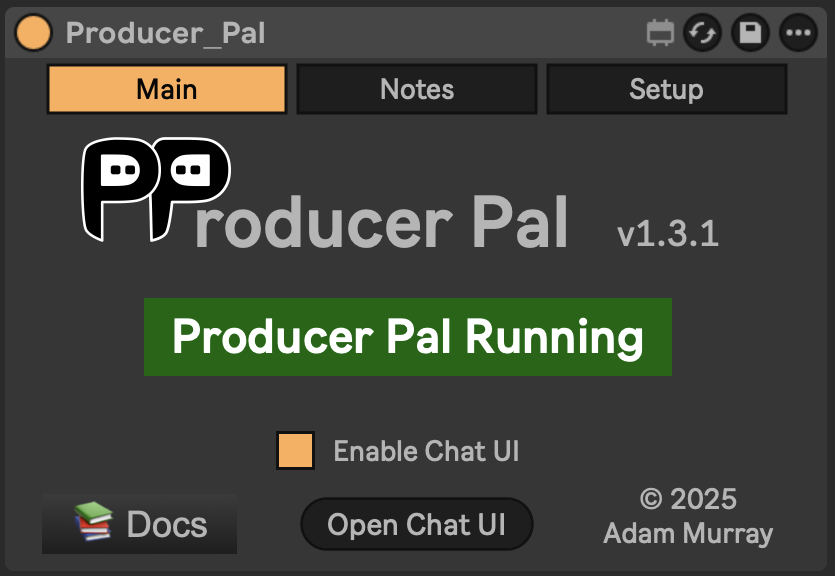 The Main tab shows the connection status and provides quick access to common
actions.
- **Version** - Current version number
- **Status indicator** - Shows "Producer Pal Running" (green), "Producer Pal
Stopped" (black), or "Producer Pal Error" (red) if something went wrong when
trying to start.
- **Docs** - Link to this documentation site
- **Enable Chat UI** - Required to use the built-in Chat UI. When enabled, the
UI is also accessible from other devices on your local network (useful for
phone access, but consider disabling on shared networks).
- **Open Chat UI** - Opens the Chat UI in your default browser
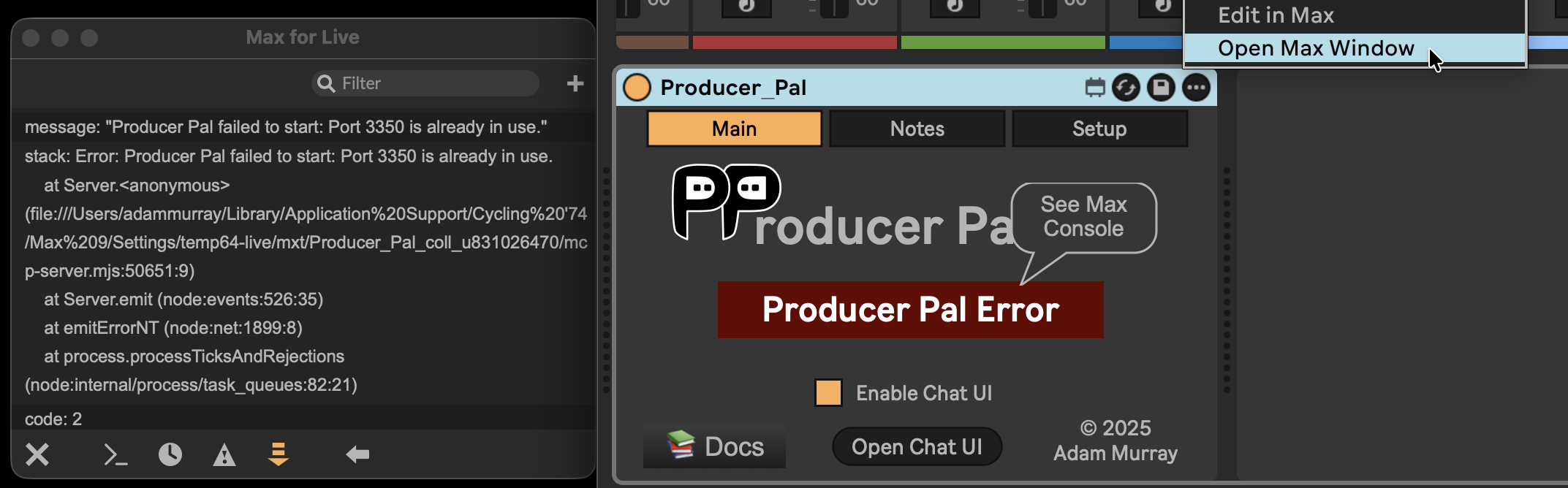
If you see "Producer Pal Error", click the three-dot menu in the upper right of
the device, select "Open Max Window", scroll down if needed, and look for an
error message.
## Context Tab
The Main tab shows the connection status and provides quick access to common
actions.
- **Version** - Current version number
- **Status indicator** - Shows "Producer Pal Running" (green), "Producer Pal
Stopped" (black), or "Producer Pal Error" (red) if something went wrong when
trying to start.
- **Docs** - Link to this documentation site
- **Enable Chat UI** - Required to use the built-in Chat UI. When enabled, the
UI is also accessible from other devices on your local network (useful for
phone access, but consider disabling on shared networks).
- **Open Chat UI** - Opens the Chat UI in your default browser
If you see "Producer Pal Error", click the three-dot menu in the upper right of
the device, select "Open Max Window", scroll down if needed, and look for an
error message.

## Context Tab
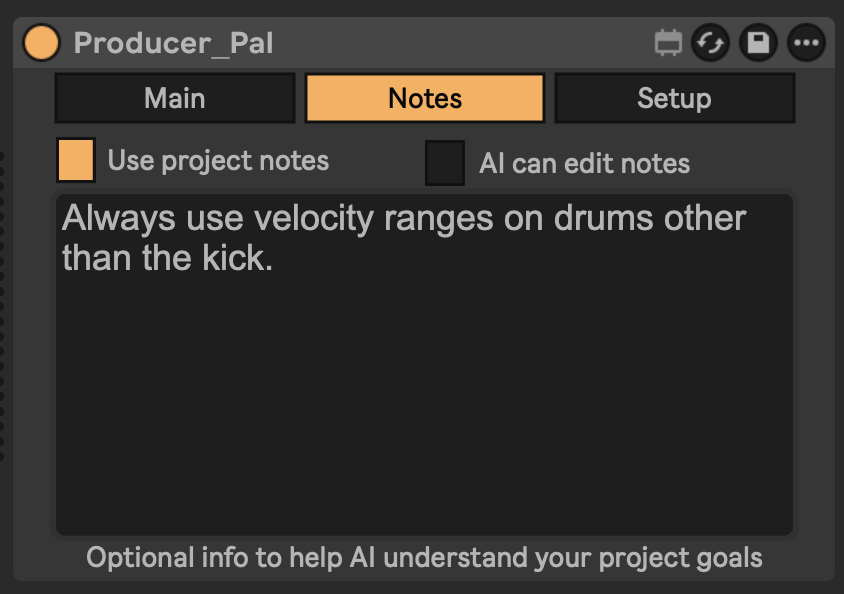 Project memory helps AI understand your creative goals and preferences. Memory
is saved with your Ableton Live Set file.
- **Use memory** - Include this memory in the AI's context
- **AI can edit memory** - Let the AI update memory to remember info across
sessions
- **Memory text area** - Your project-specific instructions and preferences
Example notes:
- "Always use velocity ranges on drums other than the kick"
- "Use occasional triplet rhythms"
- "Use strong harmonies with one chord per bar"
## Setup Tab
Project memory helps AI understand your creative goals and preferences. Memory
is saved with your Ableton Live Set file.
- **Use memory** - Include this memory in the AI's context
- **AI can edit memory** - Let the AI update memory to remember info across
sessions
- **Memory text area** - Your project-specific instructions and preferences
Example notes:
- "Always use velocity ranges on drums other than the kick"
- "Use occasional triplet rhythms"
- "Use strong harmonies with one chord per bar"
## Setup Tab
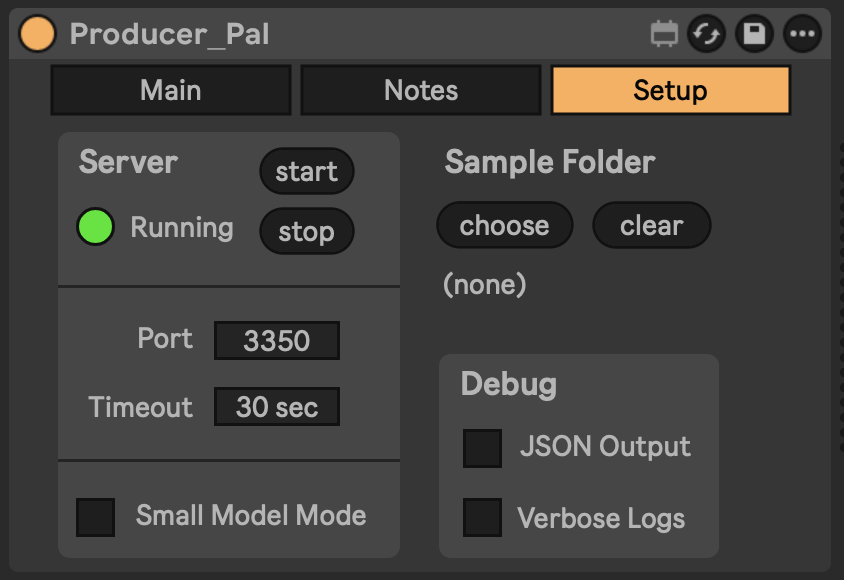 ### Server
- **Start/Stop** - Control the server that connects AI to Live
- **Port** - Network port for connections (default: 3350, change only if another
app uses this port)
- **Timeout** - Maximum time for AI operations (default: 30 sec, increase on
slow computers if experiencing timeouts during complex operations)
- **Small Model Mode** - Reduces prompt size for local/smaller models like
Ollama and LM Studio
### Sample Folder
Configure a folder containing audio samples for the "read samples" tool.
- **Choose** - Select your sample library folder
- **Clear** - Remove the configured folder
### Debug
For development and diagnostic purposes. Generally not needed for day-to-day
use.
- **JSON Output** - Display raw JSON in tool responses
- **Verbose Logs** - Enable detailed logging in the Max console
### Server
- **Start/Stop** - Control the server that connects AI to Live
- **Port** - Network port for connections (default: 3350, change only if another
app uses this port)
- **Timeout** - Maximum time for AI operations (default: 30 sec, increase on
slow computers if experiencing timeouts during complex operations)
- **Small Model Mode** - Reduces prompt size for local/smaller models like
Ollama and LM Studio
### Sample Folder
Configure a folder containing audio samples for the "read samples" tool.
- **Choose** - Select your sample library folder
- **Clear** - Remove the configured folder
### Debug
For development and diagnostic purposes. Generally not needed for day-to-day
use.
- **JSON Output** - Display raw JSON in tool responses
- **Verbose Logs** - Enable detailed logging in the Max console